
eCaring allows for completed assessments and care plans to be uploaded and accessed in the Client Profile.
To utilize the assessment and care plan features in the eCaring system, you will need to create your own forms and upload them to the platform. Here are the steps to follow:
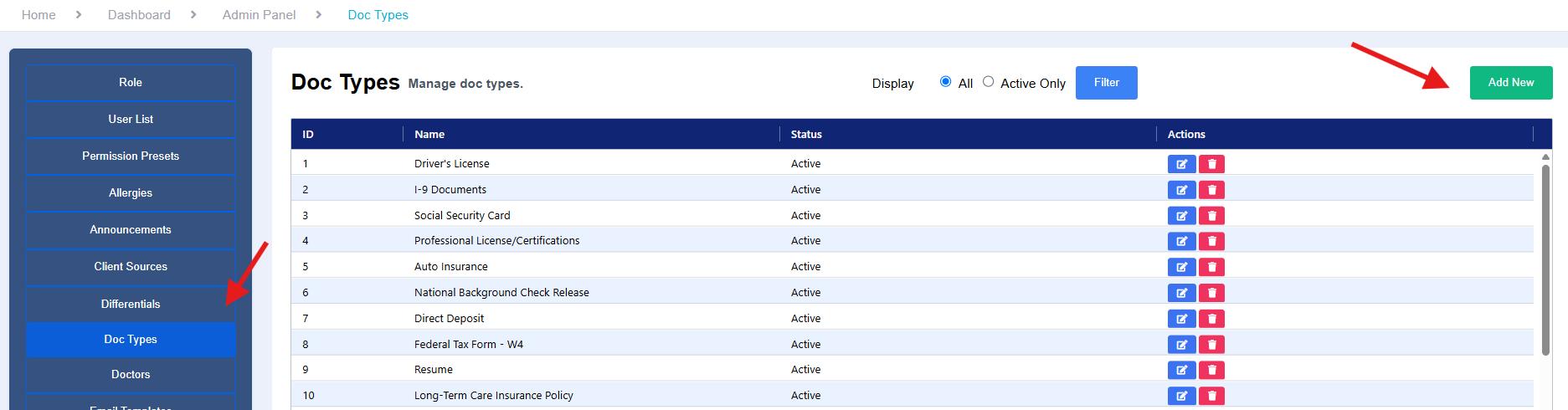
Create the Doc Type in your agency settings if it is not already listed
-
Create Your Own Forms:
- Develop your assessment and care plan forms according to your agency's standards and compliance requirements.
-
Upload Completed Forms:
- Verify that a Doc Type is created in the Admin Dashboard, for additional information on creating or updating Doc Types please review: Managing Doc Types
-
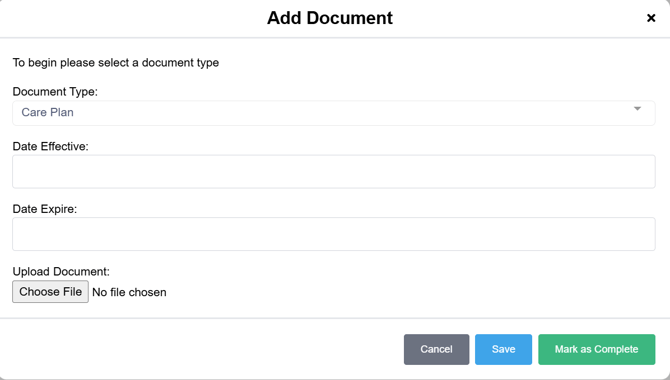
- Once your forms are completed, you can upload the file to the Client Profile by selecting Files and Add Document

- Select the Document Type from the drop-down and complete any available fields. Select Save or Mark as Complete
-
Accessing the Care Plan Section:
- Ensure that your RN user account has the necessary permissions to access the Care Plan section. This can be managed in the Admin Settings under Role Permissions.
-
Adding Notes and Information:
- In addition to uploading your forms, you can also add notes and relevant information in the Care Plan section of the client profile.
In summary, you will need to create your own assessment and care plan forms and upload them to the eCaring system. Ensure that you have the appropriate permissions to access the necessary sections and utilize the platform effectively for managing client care.