
FAQ
Q: Can I choose my agency's telephony phone number?
A: No, this number cannot be chosen and is assigned at random based on the availability of toll free phone numbers.
Q: Can caregivers call the telephony number from their personal cell phone?
A: No, caregivers must call from the client's phone number; i.e the primary phone number associated with the client profile.
Q: Where can I find my agency's telephony number?
A: Your agency's telephony number can be found by clicking System from the toolbar. The number will be displayed in the first section you view.

Q: What do aides need to clock in using telephony?
A: The aide will need to enter their IVR ID. This can be found in the aide's profile under Edit Profile > Log In Details.
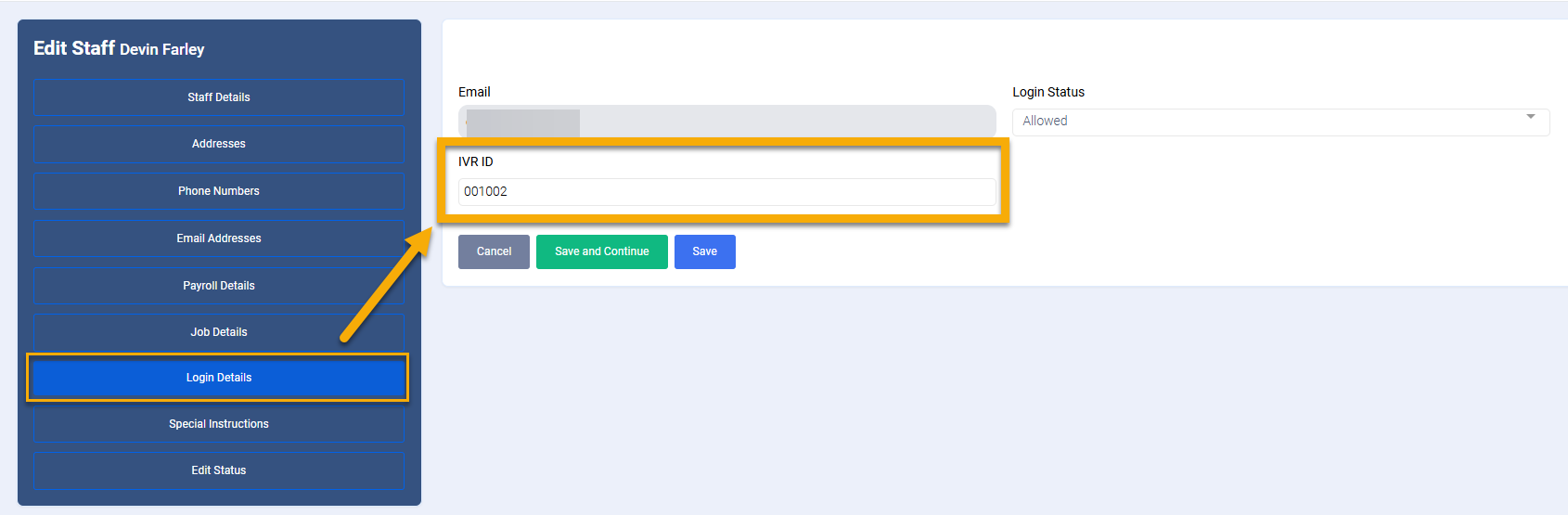
Q: Can the IVR ID be changed?
A: Yes, the IVR ID can be changed if needed.
Telephony Process - Step by Step & Script
Aide arrives at the client's home and uses the client's phone to call your agency's telephony number. The aide then uses the client's phone to clock out at the end of their shift.
Clock In
"Welcome to eCaring telephony. Please enter your staff I D followed by the pound key."
- Aide enters their ID then presses #
"Press 1 to check into the visit today for John. Press 2 to start the check out process for John."
- Aide enters 1 to clock in.
"You checked in at 10:29 am with John. You may now end the call."
Clock Out
"Welcome to eCaring telephony. Please enter your staff I D followed by the pound key."
- Aide enters their ID then presses #
"Press 1 to check into the visit today for John. Press 2 to start the check out process for John."
- Aide enters 2 to clock out.
"Please acknowledge which tasks were completed. Press 1 if you completed a task, Press 2 if you did not complete a task."
***The telephony prompt will walk through each task that is listed in the client's care plan. Below is a short example list.
"Light Housework" Aide presses 1 if complete, 2 if not complete
"Local Errands" Aide presses 1 if complete, 2 if not complete
"Dust/Polish Furniture" Aide presses 1 if complete, 2 if not complete
"Thank-you for helping John today. You checked out at 04:17 PM. You may now end the call."
Telephony Error Messages & Trouble Shooting
Error Message: The number you are calling from is not associated with any client. Please call your office.
What to do: This error message means the aide is not calling from the primary phone number associated with the client. This will need to be corrected by the office.
Error Message: The enter staff ID and Pin combination are not correct. Please enter your staff ID followed by the pound key.
What to do: The aide should attempt to reenter the ID and Pin if they believe it is correct. If the ID and Pin combination continues to fail, they must call the office to verify their ID and Pin.