
eCaring Release Notes v2606
This release introduces new operational dashboards, improves EVV and payroll workflows, strengthens billing accuracy, and adds several scheduling, reporting, notification, and visit-management improvements.
Insights & Operational Dashboards
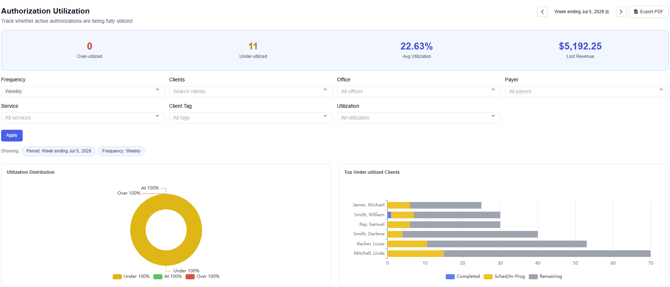 Authorization Utilization Dashboard
A new Authorization Utilization Dashboard is now available under Insights. This dashboard highlights authorizations that are being underutilized.
Why this matters: Agencies can identify clients whose authorized services may not be fully scheduled or delivered before units or hours expire.
Permission note: Access to this dashboard is controlled by a new permission.
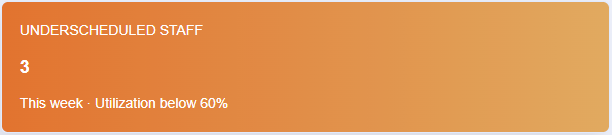 Underutilized Staff Dashboard Widget
A new dashboard widget now highlights Underutilized Staff in eCaring. Clicking the widget takes users directly to the Caregiver Utilization Dashboard.
Why this matters: This makes it easier for supervisors and schedulers to identify available caregiver capacity and take action.
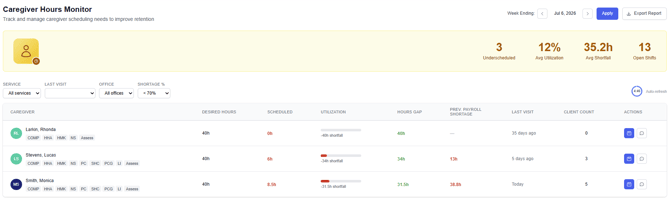 Caregiver Utilization Dashboard Improvements
The Caregiver Utilization Dashboard has been improved with additional filters and usability updates.
Office staff are also now excluded from the Caregiver Utilization Dashboard.
Why this matters: Utilization reporting should better reflect direct-care staff availability and avoid inflating the dashboard with office users.
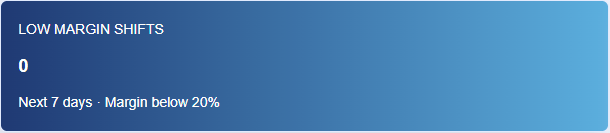 Low Margin Dashboard Widget
A new dashboard widget displays low-margin shifts. Clicking the widget takes users directly to the Low Margin scheduling page.
Why this matters: Teams can more quickly identify shifts that may need scheduling, rate, or staffing review.
Billing & Rates
Bill Rate Effective Date Validation
eCaring now compares the visit Date of Service against the Service Rate Effective Date during:
- Verification
- Completing Billing
- Undoing Billing
This helps ensure visits are billed using the rate that was active for the Date of Service.
This also applies when a visit was previously billed, a rate was updated, and the visit is later re-billed.
Why this matters: If service rates are updated after visits have already occurred, eCaring will now consistently apply the rate that was effective on the visit’s Date of Service, helping prevent incorrect billing amounts and reducing manual corrections.
EVV
Payroll Warning for Unaccepted EVV Visits
eCaring now displays a warning when users create a Payroll batch that includes EVV visits that are not accepted.
Why this matters: This helps teams identify EVV issues before payroll is finalized and improves consistency between EVV, Payroll, and Billing outcomes.
EVV Terminology Updated from “Approved” to “Accepted”
To better align with EVV aggregator statuses, eCaring now uses Accepted instead of Approved.
Why this matters: A visit may be accepted by the aggregator while still having exceptions that require review in the aggregator portal. The updated wording better reflects the actual EVV status.
EVV Re-Submission After Visit Documentation Updates
eCaring now includes visit tasks in EVV re-submission logic. When tasks are edited on completed visits, the visit may be automatically re-sent to the EVV aggregator.
This also applies when an agency user completes a task or marks a previously completed task as incomplete after the visit has already been completed.
Why this matters: Agencies no longer need to manually re-send applicable visits after visit documentation changes.
Scheduling & Visit Management
Conflict Checker Improvements
The Scheduling Conflict Checker now excludes visits related to inactive clients and deleted visits.
Why this matters: Users should see fewer false conflict warnings when editing schedules, allowing them to focus on actual scheduling conflicts.
In-Progress Visit Protection
If a visit is In Progress, users can no longer:
- Move the visit to Open
- Change the assigned Staff
Why this matters: This helps prevent payroll and billing issues caused by changing a visit after it has already started.
Open Visit Labeling Fix
We resolved an issue where some workflows labeled a visit as an Open Recurrence when it was actually a single visit or Fill-in.
Why this matters: Open visits should now be labeled more accurately, making it easier for schedulers to understand what type of coverage is needed.
Updating Indicator on Calendar Views
When visits are updating through Edit Recurrence or Time Off through Availability, impacted visits now show an updating icon on Schedule calendar views.
Why this matters: Users have clearer visibility when recurrence or PTO-related changes are still processing.
Reset Visit and Cancel Visit Workflow Improvements
The Reset Visit and Cancel Visit workflows have been enhanced.
Previously, users could only reset visits that were In Progress or Complete. Users can now reset eligible Cancelled visits back to Scheduled while preserving audit history.
If a Cancelled visit was paid and/or billed, it cannot be reset.
Users can also cancel In Progress visits directly from the Edit Shift modal or calendar hover menu without first resetting the visit.
Why this matters: Visit management is faster and more flexible while still protecting paid and billed records.
Every-Other-Week Recurrence Fix
We addressed an issue where visits that were part of an every-other-week sequence could sometimes fail to generate properly.
Why this matters: Recurring schedules should now generate more reliably for every-other-week visit patterns.
Notifications & Messaging
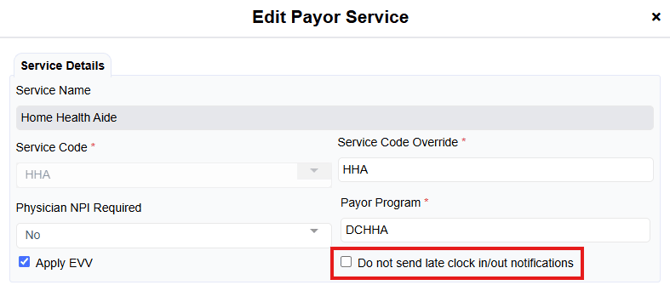
Missed Clock-In/Out Notification Controls
Agencies can now set default values for whether service or visit workflows generate missed clock-in/out notifications.
This can also be overridden at the recurrence or visit level.
Why this matters: Agencies can disable missed clock-in/out notifications in special cases where those alerts are not useful or desired.
Client Follow-Up Notifications Now Show Related Staff
When a Client Follow Up Required notification is submitted, the Notifications grid now shows which Staff member submitted the request.
Why this matters: Office users can more quickly identify who submitted the follow-up request without additional investigation.
Group SMS Improvements
Sending group messages is now faster and more reliable.
We also fixed an issue where tapping the Group SMS button multiple times could cause duplicate message requests.
Why this matters: This reduces duplicate messages and improves the group messaging experience.
Payors, Payroll & Staff
Payor Office Assignment Moved to Payor Profile
Office assignment has been moved to the Payor Profile during payor creation.
Why this matters: Creating a new Payor now requires fewer clicks and fewer permissions because the Payor-to-Office association is configured directly on the Payor Profile.
Sick/Vacation Payable Status Updates Now Reduce PTO Balances Correctly
If a visit is cancelled for Sick or Vacation and the Staff originally did not wish to be paid, updating the visit from Non-Payable to Payable now:
- Updates the reason to Sick PTO or Vacation PTO
- Reduces the staff member’s PTO balance by the paid amount
Why this matters: PTO balances now update correctly when Sick or Vacation visits are later changed to payable.
Generic Payroll Staff Identifier Fix
We fixed an issue where Generic Payroll configuration excluded the Staff Identifier from overtime hours.
Why this matters: Payroll exports should now include the Staff Identifier correctly for overtime records.
Mileage Estimate Display Fix
Mileage estimates are no longer displayed in Shift Details or Payroll Preview for Staff with no car when Mileage Eligibility Requirements are set to Only those with Car.
The payroll export was already correctly excluding the mileage amount.
Why this matters: The on-screen display now matches payroll export behavior and avoids confusion during payroll review.
Reporting
Staff Report Address 2 Field
The Staff Report now includes the Address 2 field.
Why this matters: Unit and apartment numbers can now be included properly in staff reporting.
Visit Summary Download from Notes Report
Users can now download the Visit Summary from mobile visits on the Notes Report.
Why this matters: Mobile visit documentation is easier to access and export from reporting.
Summary
This release strengthens operational visibility through new dashboards, improves EVV and payroll alignment, reduces scheduling errors, and gives administrators more control over alerts, reporting, and visit management workflows.