
eCaring Release Notes
This release includes a combination of improvements that are already available in production and a preview of new functionality coming with the next eCaring Staff mobile app update (v1.0.5).
To make the timing clear, we have separated the release into:
- Available Now — functionality and fixes that customers can use today
- Coming Soon — mobile-related functionality that will be enabled after eCaring Staff v1.0.5 becomes available
Available Now
Billing & Financial Workflows
Billing Batch Creation Is Now Safer
eCaring now prevents multiple billing batches from being created at the same time for the same organization.
While a billing batch is processing, the Create Batch button will display Batch Creation In-Progress and cannot be selected again until the current batch finishes.
Why this matters: This reduces duplicate, failed, or orphaned billing batches and gives users clear feedback that billing is already running.
Billing Summary and Completed Batch Totals Have Been Improved
We corrected several scenarios where totals displayed in Billing Summary or Completed Batch Detail pages could differ from the sum of the underlying claims or visits.
Why this matters: Billing users should now see summary values that more consistently reconcile with the detailed records.
Non-Billable Services Now Display Correctly in Verification
Visits using services configured as Non-Billable now display as Non-Billable in Verification immediately.
Previously, those visits could initially appear as Billable until a user opened Shift Details and selected Save or Verify.
Why this matters: Verification users can more accurately review billable status without needing to update the visit first.
Improved Invoice Address Formatting
Invoice PDFs now correctly include secondary address information such as:
- Suite numbers
- Apartment numbers
- Other Address 2 information
The invoice address formatting has also been improved so complete mailing addresses display more consistently.
Improved Care Circle Contact Validation
eCaring now prevents incomplete Care Circle contacts from being saved.
In certain relationship scenarios, incomplete contact records could create incorrect relationships and could also affect billing.
Why this matters: This helps protect Client and billing data from incomplete Care Circle records.
Authorization Utilization
Client Status Filter
The Authorization Utilization Dashboard now includes a Client Status filter so users can distinguish between:
- Active Clients
- Inactive Clients
Why this matters: Teams can focus authorization review on the population that is most relevant to their current operational workflow.
Additional Authorization Utilization Updates
Authorization Utilization now provides additional financial and operational context, including:
- Estimated reimbursed cost related to over-utilized authorizations
- Easier access to edit or review the Client's schedule
Why this matters: Users can better understand the potential financial impact of authorization utilization and move more quickly from identifying a problem to adjusting the schedule.
Scheduling & Open Shifts
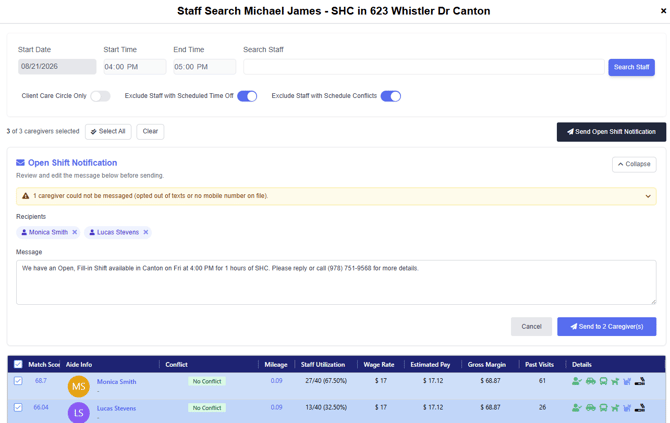
Message Caregivers Directly from Staff Search
When trying to fill an Open Shift, users can now select all or a subset of caregivers from Staff Search and send them information about the available shift.
Why this matters: Scheduling teams can reach eligible caregivers directly from the staffing workflow rather than creating a separate recipient list.
Open Status Scheduling Page
The Open Status scheduling page provides a dedicated view of visits without an assigned caregiver.
Users can also access this page from the Open Shifts This Week dashboard widget.
Why this matters: Open visits are easier to identify and work from a single scheduling view.
Overnight Visits Now Display Correctly in Shift Monitor
Previously, Shift Monitor required both the visit start and end date to fall within the displayed week.
This could prevent overnight visits beginning on the final day of the week from appearing.
Overnight visits will now display appropriately based on both their Start Date and End Date.
Additional Recurrence Reliability Improvements
We corrected a recurrence-editing scenario involving multiple bill rates that had been effective during the lifespan of a recurrence.
We also added additional protections to prevent authorization changes from interfering with related recurrence updates while they are still being processed.
Why this matters: Recurring schedules should be less likely to enter incomplete or inconsistent states during complex updates.
Verification
Overlapping Visits Can Be Excluded from Auto-Verification
eCaring now includes a business rule that prevents a visit from being automatically verified when it overlaps with another completed visit.
This applies even if the visit otherwise meets all Auto-Verification rules.
Configuration Note: This setting can be disabled within Auto-Verification Settings if your organization does not want overlapping visits excluded.
Why this matters: Overlapping visits may require manual review before payroll or billing, and this helps prevent those visits from being automatically approved without that review.
Cancelled Visits Cannot Receive Date Adjustments
Date adjustments can no longer be added to Cancelled visits.
Previously, a date adjustment could cause a Cancelled visit to change to Complete.
Why this matters: This protects cancelled visit history and prevents unintended status changes.
Verification Summary Totals Are More Accurate
The Verification Summary Table now calculates:
- Pay Hours
- Pay Units
- Bill Hours
- Bill Units
based on whether each visit is actually Payable or Billable.
Summary totals also automatically recalculate when in-grid filters are applied.
Why this matters: The summary should now match the visits currently displayed in the Verification Grid.
Verification Export Formatting Fix
We corrected formatting issues that could affect certain columns when exporting the Verification Grid.
More Reliable Official Time Updates
The background process that stores Official Times now retries if the first attempt fails.
Previously, an intermittent failure could result in stale or fallback Scheduled Times being displayed instead of the expected Official/EVV time, while this would have been automatically corrected with a future save, update or billing calculation, the system will now automatically retry.
Why this matters: Completed visits should more reliably display the correct Official Time in Shift Details.
Reporting & Activity Records
Large Activity Report Downloads Now Run in the Background
Bulk Activity Report generation has been moved to a background process.
When a large set of reports is requested:
- eCaring begins generating the files in the background.
- The user can continue working elsewhere in the application.
- A notification appears when the export is complete.
- The notification includes a link to download the generated files.
- The user will also receive an email with a download link.
Why this matters: Large audit and billing exports are less likely to time out and no longer require users to wait on the report page.
Combined and Individual Activity Report Downloads
Users can now choose how bulk Activity Reports are generated:
- Combined — all selected Activity Reports in a single PDF
- Individual — separate PDFs for each selected Client
Why this matters: Agencies can choose the format that best matches billing, audit, record-sharing, or archival workflows.
No Client Signature Reason Added to Visits Report
A new No Client Signature Reason field is available in Reports → Visits.
When Staff document why they were unable to obtain a Client signature, that reason can now be reported.
Why this matters: Compliance and operations teams can more easily analyze missing signature patterns and understand why signatures were not obtained.
Visit Report Duplicate Rows Fix
We corrected an issue that could cause duplicated records to appear in the Visits Report.
Staff & User Management
Registered Usernames Can Now Be Updated
In most scenarios, eCaring now allows the username associated with a registered user to be changed.
The new username cannot already belong to another registered eCaring user.
The login email is also protected from being removed or cleared while it is being used as the user's login.
Why this matters: Agencies have more flexibility when Staff email addresses or usernames change without needing to recreate the user.
Staff Status Fix for Users Associated with Multiple Organizations
We corrected an issue where Staff associated with multiple eCaring organizations could encounter problems when changing between Active and Inactive/Terminated statuses.
Primary Scheduler and Primary Nurse Search
When creating or editing a Staff record, users can now type to search within the:
- Primary Scheduler field
- Primary Nurse field
Why this matters: Large Staff lists are easier to work with when assigning these relationships.
Billing / EDI
Billing Provider Secondary Identifier Support
eCaring now supports the Billing Provider Secondary Identifier within EDI files for payer scenarios that require an alternate provider identifier.
This can apply to:
- Certain Medicaid programs
- Certain Gainwell implementations
- Providers that use alternate Medicaid or payer-specific provider IDs
Why this matters: This expands eCaring's ability to meet payer-specific EDI requirements without custom file manipulation.
Additional Companion Guide Flexibility
Additional internal Companion Guide configuration has been added to support payer-specific EDI formatting requirements, including Idaho Gainwell scenarios.
Payroll Notifications
Payroll Email Formatting Fix
We corrected HTML formatting problems that could appear in certain payroll-related email notifications.
Schedule Navigation Cleanup
Unused Schedule pages that were not functional have been removed from the navigation to reduce confusion.
Coming Soon — eCaring Staff v1.0.5
A significant update to the eCaring Staff mobile app is expected soon.
The 2608 web release contains the administrative foundation needed to support these new mobile features, but the mobile-dependent settings will remain hidden or disabled until the updated mobile app becomes available.
Customers do not need to configure these new settings yet.
New eCaring Staff Settings Page
Mobile-related configuration has been consolidated into a single page within Admin.
This page contains current mobile settings today and will become the central location for the new v1.0.5 functionality described below.
Permissions
By default:
- Roles can view the eCaring Staff Settings page
- Users assigned the Management role can edit the settings
Additional mobile controls will be enabled after the updated mobile app is available.
Coming Soon: Caregiver Sick & Vacation/PTO Balance Visibility
Agencies will be able to control whether caregivers can see their available:
- Sick Time balance
- Vacation/PTO balance
When enabled, caregivers will see the amount actually available to schedule.
The Remaining balance is calculated as:
Accrued – Used – Pending/Scheduled = Remaining
Why this matters: Caregivers can better understand their available time without contacting office or payroll staff for a balance.
Configuration
The Sick and Vacation display controls will be located on the new eCaring Staff Settings page.
These controls will be enabled only after mobile v1.0.5 is available.
Coming Soon: Control the Mobile Schedule Horizon
Agencies will be able to control how far into the future caregivers can view their schedule.
Options will include:
This Week + Next Week
This will remain the default behavior.
The exact week boundaries will follow the organization's configured start-of-week setting.
Rolling Period
Administrators can select a rolling number of days from:
1 to 30 days
Why this matters: Agencies can choose how much future schedule information is appropriate for their staffing model.
Coming Soon: Control Open Shift Visibility
Agencies will be able to turn the Open Shifts experience on or off in eCaring Staff.
The setting will initially remain enabled to preserve existing behavior.
If disabled, caregivers will no longer see the Open Shifts experience in the app.
Why this matters: Organizations that do not use caregiver self-selection or Open Shift workflows can remove that option from the mobile experience.
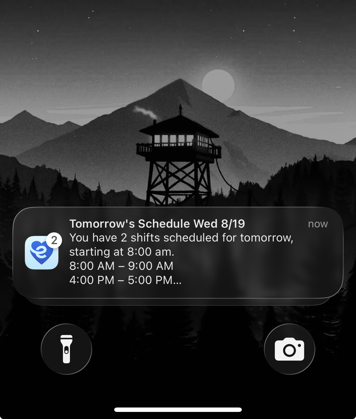
Coming Soon: Next-Day Schedule Reminder Push Notifications
eCaring Staff v1.0.5 will introduce Next-Day Schedule Reminder notifications.
Caregivers scheduled to work the following business day can receive a push notification reminding them to review their schedule.
Default Behavior
The planned default reminder time is:
4:00 PM in the organization's local time zone
Administrators will be able to:
- Enable or disable the reminder
- Select the hour when the reminder is sent
Why this matters: These reminders can help reduce missed visits, late arrivals, and after-hours questions related to schedule changes.
Coming Soon: Full Historical Shift Access
The existing limit that displays only the most recent 10 past visits will be removed.
Caregivers will be able to scroll through all of their:
- Completed visits
- Missed visits
The Past Shifts experience will load additional records as needed so large histories remain performant.
Important: Completed visits that are unverified and still eligible for changes may remain editable according to agency settings. Verified or locked visits will remain view-only.
Coming Soon: Improved Authentication Reliability
The mobile application now includes additional protection against unnecessary logouts during poor or intermittent network connectivity.
Updates include:
- Better retry handling
- A short grace period around authentication refreshes
- Improved synchronization when multiple authentication requests occur simultaneously
- Protection against background app activity incorrectly signing a caregiver out
Why this matters: Caregivers should be less likely to lose their session simply because the device temporarily loses connectivity.
Coming Soon: Improved Language Selection
The Language setting in the mobile Profile has been changed from a flat list to a dropdown-style selector.
Users will also be asked to confirm a language change before it is applied.
Why this matters: This reduces accidental language changes while making language selection more intentional.
Timing & Rollout
The web-side administration required for these new mobile features is included in the 2608 release.
However:
- The new mobile-dependent settings will remain hidden or disabled initially.
- Customers do not need to make configuration changes yet.
- eCaring Staff v1.0.5 must first become available and be updated on caregiver devices.
- eCaring will communicate separately when the new mobile functionality and settings are ready to use.
This phased approach prevents customers from enabling a setting before the caregiver application can support the corresponding behavior.
Summary
Available Now
This release improves:
- Billing accuracy and batch reliability
- Authorization Utilization
- Open Shift workflows
- Activity Report generation
- Verification controls and reporting
- Staff and user management
- EDI flexibility
- Scheduling reliability
- Reporting accuracy
Coming Soon
eCaring Staff v1.0.5 will introduce:
- Caregiver Sick and Vacation/PTO balance visibility
- Configurable future schedule visibility
- Configurable Open Shift visibility
- Next-Day Schedule Reminder notifications
- Full historical shift access
- Improved authentication reliability
- Improved language selection
- Enhanced push-notification infrastructure