
There are two areas in which a staff status change can be made.
Option 1: Staff Job Details Page
Step 1: Access Your Profile
- Select on Staff in the Menu Bar

Step 2: Edit your Profile
- Select Edit to edit your profile
Step 3: Select on Edit next to status

Step 4: Edit the Status
- Select Update

- Update the status from the drop-down menu; depending on the status, another option may appear.
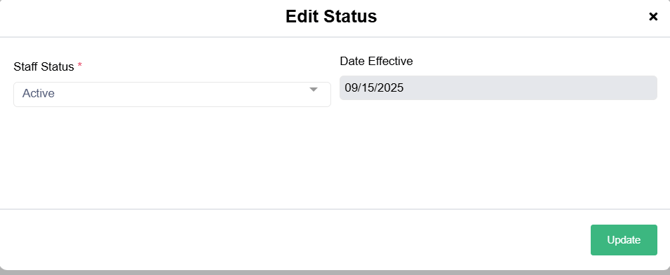

- Make selections and select Save
- The status is now effective

Option 2: Edit Status Option
Step 1: Access Your Profile
- Select on Staff in the Menu Bar
Step 2: Edit your Profile
- Select Edit to edit your profile
- On the Staff Details page, select Edit next to Status or select Edit Status from the Menu Bar
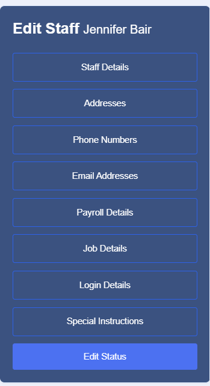
- Select Update
- Update the status from the drop-down menu; depending on the status, another option may appear.
- Make selections and select Save
- The status is now effective
Terminated Staff
Step 1: Edit the Profile to the status of Terminated using the steps above
Step 2: Update Details
- Select on Job Details to update Termination Date and Reason

- Select Save
Important Considerations When Changing Staff Status
- Future scheduled visits automatically move to Open.
- Future effective dates are supported in the event that a future notice is turned in by the staff member
- Cancelled, Completed, and Missed visits remain unchanged.
- Recurring visits become Open Recurrence.
- One-time visits become Open Fill-In.