
This article provides instructions on how to group and ungroup data in reports, allowing users to customize their report views effectively.
How to Group Data in Reports
- Identify the column you want to group in your report.
- Click on the name of the column and drag it to the top of the grid.

- The data will now be grouped based on the selected column.

How to Ungroup Data in Reports
- To ungroup a column, locate the white "X" next to the grouped column header.
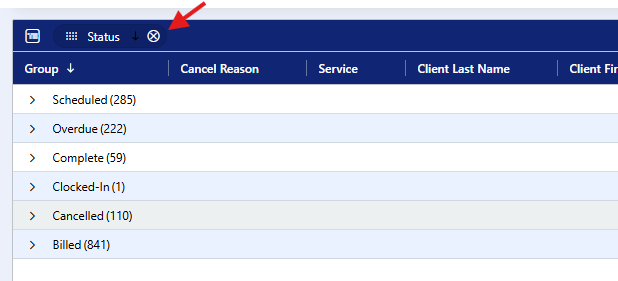
- Click the "X" to remove the grouping.
Additional Tips
- Grouping allows for better organization of data, making it easier to analyze trends and totals.
- If you need to sort the data after grouping, ensure that you apply any filters before grouping the columns, as some filters may not work on grouped data.
Grouping and ungrouping in reports is a straightforward process that enhances data visibility and organization. By following the steps outlined above, users can tailor their reports to meet specific needs and preferences.