
Where to Find EVV Errors
eCaring makes sending visit information for EVV quick and easy; however, sometimes visits will come back with an error message that means it wasn't received.
You can monitor for errors by selecting Verification from the main toolbar, then select EVV from the mini toolbar that appears.

Utilize any of the available filters to narrow down your results if needed.

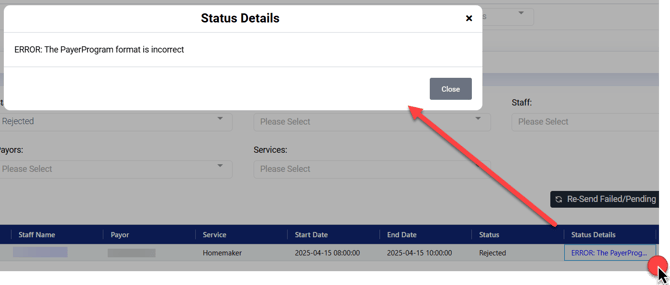
If a visit is rejected it appear similiar to below;

You will find the Status and Status Details will state Rejected, and then it will provide the reason for the rejection. Click on the Status Details to view the full Details message.
There are three tabs to review for errors:
-
Visits - The visits themselves can often be rejected for a variety of errors like incorrect Payor Program or Procedure Code
-
Clients - Clients will typically be rejected for not having a Medicaid ID or date of birth on their client profile
-
Caregivers - Caregivers will often be rejected for odd characters in their name like brackets or parenthesis
Once you have followed the steps to resolve the Error, check the visit(s) that need to be re-sent:

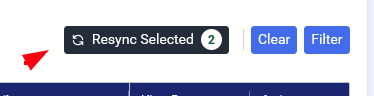
Then click the "Resync Selected" button
Below is a list of Status Detail messages and how to resolve them.
Visits
| Error | Meaning | Resolution |
|
ERROR: The ClientOtherID format is incorrect |
The Billing ID we’re sending doesn’t match what SanData is expecting |
|
|
The ClientID format is incorrect |
SanData doesn’t recognize the billing ID |
It’s possible the system didn’t send the client’s information. Go to Admin > EVV Aggregators and click “Sync Clients”. Or try the 4 steps from above ^ |
|
ERROR: The ProcedureCode format is incorrect |
The Procedure Code for the service is not accepted by SanData |
Got to Payors > [Select Payor] > Edit Services > Procedure Code > correct the Procedure Code based on the specifications. If it’s not in the specifications, then it shouldn’t be sent to EVV. |
|
ERROR: The Call In cannot be greater than the Call Out |
The Electronic Clock in Time is before the Electronic Clock Out Time |
They will need to make a Date Adjustment to the visit for both the Start Date/Time and Stop Date/Time |
|
ERROR: The ReasonCode value is incorrect |
The Reason Code being sent from eCaring to the EVV vendor is not an accepted reason code to the specifications |
Please contact support. There is likely a change in Reason Codes. |
|
ERROR: The AdjOutDateTime cannot be less than the Call In |
We’re sending incorrect date adjustment data |
Please contact eCaring support. |
|
ERROR: The call date and time must be in the past. The record is being rejected. |
Someone in the office manually added a “clock out” time before the visit was over. |
Re-submit the visit after the clock out time has passed. |
|
Client not found |
The client attached to this visit was rejected by the EVV Aggregator |
Check the Clients tab in the EVV monitor to correct. Then, re-submit the visits. |
|
Worker not found |
The caregiver attached to this visit was rejected by the EVV Aggregator |
Check the Caregivers tab in the EVV monitor to correct. Then, re-submit the visits. |
Clients
| Error | Meaning | Resolution |
|
ERROR: The ClientIdentifier cannot be null. |
The EVV Identifer we’re sending is blank |
Refer to the “Billing ID Type” in the same row of the monitor. For example, if it states “Medicaid ID”, then you will need to add a Medicaid ID on the client’s Billing profile. |
|
ERROR: Client Not Found. Clients must have been previously received from Payer to be updated via Alt-EVV. |
SanData doesn’t have a match for this client in their system. |
Most likely SanData is expecting a Medicaid ID to match the client’s first name, last name, and date of birth. You will need to add a Medicaid ID on the client’s Billing profile. |
|
ERROR: The ClientFirstName format is incorrect. The record should satisfy this regular expression ['([ ]*)([A-Za-z'.\-]+)([A-Za-z'.\- ]*)']. Invalid Value='John "Johnny"'. |
The client’s first name has odd character (typically used for preferred names) |
Update the client’s first name on the profile and remove the unexpected characters (apostrophes, brackets, etc.) If it’s the client’s preferred name, then please use the “Preferred Name” field on the demographics page. |
|
ERROR: The ClientBirthDate format is incorrect. The record should satisfy the date format ['yyyy-MM-dd']. Invalid Value='null'. |
The client doesn’t have a Date of Birth on their profile. |
Update the client’s Date of Birth on their demographics page. |
|
ERROR: The ClientAddressLine1 cannot be null. |
The client’s address on the Demographics page is empty |
This is usually caused during the migration process to eCaring. Add the client’s address on their Demographics page. |
Caregivers
| Error | Meaning | Resolution |
|
ERROR: The EmployeeLastName format is incorrect. The record should satisfy this regular expression ['([ ]*)([A-Za-z'.\-]+)([A-Za-z'.\- ]*)']. Invalid Value='Name'. The record is being rejected. |
The last name of the caregiver has a character not supported by SanData |
Update the caregiver’s last name so only A-Z characters and hyphens are in it. |
|
ERROR: The EmployeeFirstName format is incorrect. The record should satisfy this regular expression ['([ ]*)([A-Za-z'.\-]+)([A-Za-z'.\- ]*)']. Invalid Value='Name'. The record is being rejected. |
The first name of the caregiver has a character not supported by SanData |
Update the caregiver’s first name so only A-Z characters and hyphens are in it. |