
New "Add Authorization" Form |
 |
|
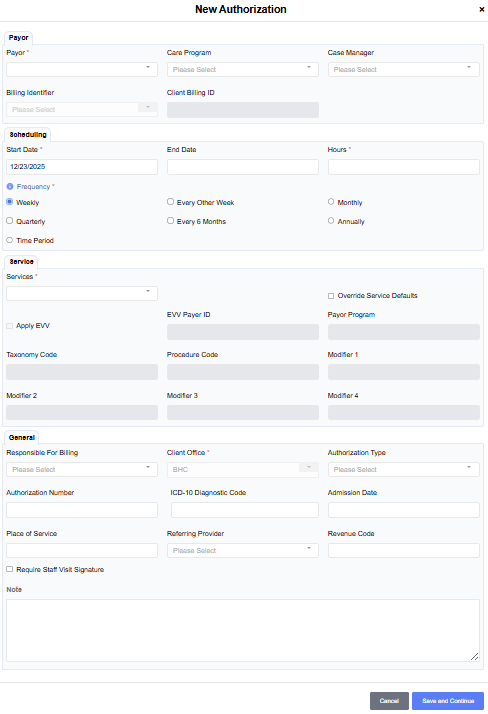
When creating a new authorization, users will see all of the fields they are already familiar with, but in a newly organized form. The new form is designed to group fields by functional areas. Payor, Scheduling, Services, and General. |
New "Edit" and "Update" Authorization Workflows |
|
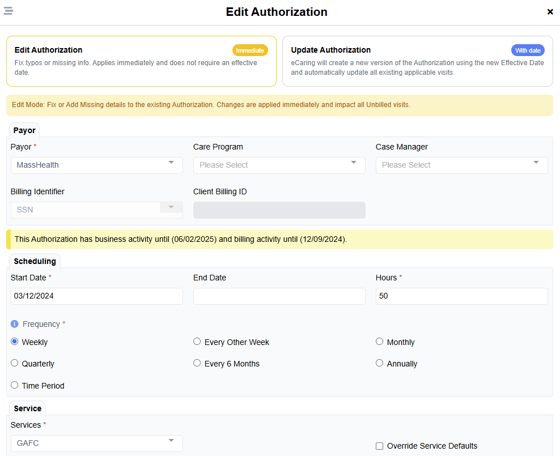
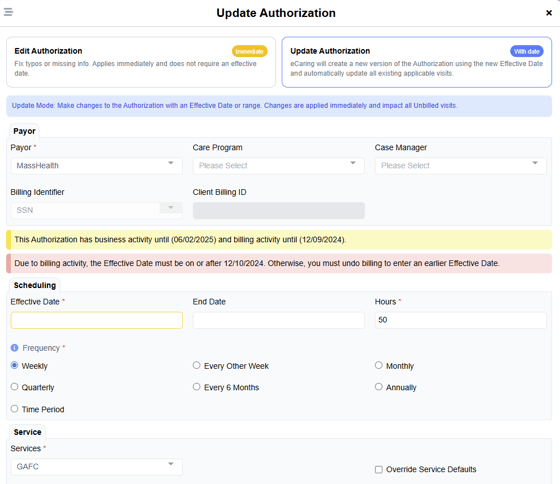
This release brings important new functionality to eCaring by requiring users to choose a path when making changes to an authorization, “Edit” or “Update”. |
 |
|
“Edit” - The ability to make changes to an authorization that apply immediately across the entire date range. This is great for adding information that wasn’t available when the authorization was initially created (like an ICD-10 code, Authorization number, etc). Note, if you’ve already billed visits against an authorization and make this type of change, if you were to un-do billing and re-bill those visits, they will use the information that is currently displayed on the authorization. |
 |
|
“Update” - eCaring will create a NEW version of the authorization using the “Effective Date” entered and automatically update all impacted visits to be associated with the new authorization. This is great for situations where a change is made effective as of a specific date. For example: A client has been assigned to a new payor or service but the schedule will remain the same. Or, a client receives an increase or decrease in services for a specific date range, or a detail about the authorization critical for billing has changed; an authorization number or ICD-10 code changes as of a specific date. “Update” allows you to keep the existing schedule in place while creating a new authorization and the system will automatically update and associate the existing visits with the new authorization. |