
-
This article explains how to collect SMS messaging consent from clients and staff during onboarding, record opt-in preferences in eCaring, and manage opt-out requests in compliance with FCC guidelines.
During client intake or staff onboarding, the agency collects all client and staff demographic information to create a record of that person in the eCaring platform.- When a Mobile number is offered by the Client or Staff, agency informs them of messaging capability of the eCaring platform and asks them if they'd like to receive messages from the agency.
- Agency enters Client or Staff phone number in eCaring and identifies the type of number as "Mobile". Users are only able to dispatch messages to "Mobile" numbers.
- Attestation of Consent
- The FCC enforces strict guidelines on commercial messaging to prevent fraud and spam. It is essential that your agency establishes clear guidelines and documented use cases for messaging before sending any messages. We recommend at minimum a verbal talk track like the one below:
Note: Written or digital consent (such as a signed form or a checked opt-in box) is also an acceptable method of obtaining consent. Contact your compliance team for guidance on documentation requirements in your state.
- Onboarding Coordinator: Hi [Caregiver's Name], welcome to [Agency's Name]! As part of our caregiver team, we like to enable communication via text messaging. If you opt-in, we will send you important updates about your schedule, shift changes, and notifications if you forget to clock-in or out at your shift's scheduled time. Would you like to receive these messages?
- If "Yes": Great! You're now enrolled, you will receive a "Welcome" message momentarily, if you'd ever like to stop receiving messages, just reply "Stop" and the system will no longer allow us to send you messages.
- If "No": No problem! You won't receive messages, if you'd like to in the future, just reach out to our team and we can sign you up.
- Onboarding Coordinator: Hi [Caregiver's Name], welcome to [Agency's Name]! As part of our caregiver team, we like to enable communication via text messaging. If you opt-in, we will send you important updates about your schedule, shift changes, and notifications if you forget to clock-in or out at your shift's scheduled time. Would you like to receive these messages?
- The FCC enforces strict guidelines on commercial messaging to prevent fraud and spam. It is essential that your agency establishes clear guidelines and documented use cases for messaging before sending any messages. We recommend at minimum a verbal talk track like the one below:
-
- Once you've reviewed with your contact, select the proper Opt-in preference in eCaring.
- No, don't opt-out — This option means the client or staff member has consented to receive messages from the agency via eCaring.
- "Yes, opt-out" - means that the Client or Staff has NOT consented to receive messages from the agency via the eCaring platform.
- When No, don't opt-out is selected, eCaring automatically sends the client or staff member a Welcome message.
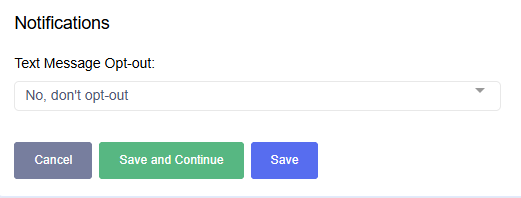
- eCaring will dispatch the "Welcome" message to the user which includes the Agency's information as well as Opt-out instructions.
- “Welcome to {AGENCY NAME}! Please save this number in your contacts as we’ll use it for important communications. To unsubscribe, reply “Stop”. Reply “Start” to receive messages again.”
- When a user Replies "Stop", eCaring will automatically update that user's Profile to display the Opt-out status: "Yes, Opt-out".
- When a User's Status is set to "Yes, Opt-out", the messaging options in eCaring will be disabled for that user.
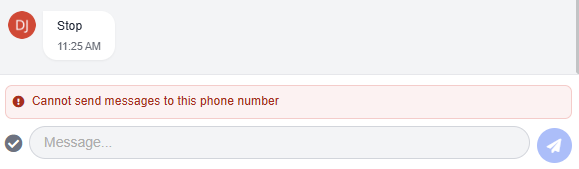
- In the future, if a user wishes to start receiving messages again, they can reply "Start" which will update their status back to "No, Don't opt-out" and allow that user to be messaged again from eCaring.